
JoyPlan-Quick House Design 3D
JOYPLAN PTE. LTD.House & Home
3.88.00 Reviews
- Version
- 26.2.2
- Installs
- 500.00K
- Age Rating
- Everyone
Screenshots

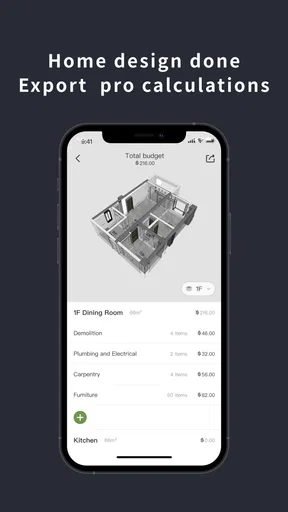
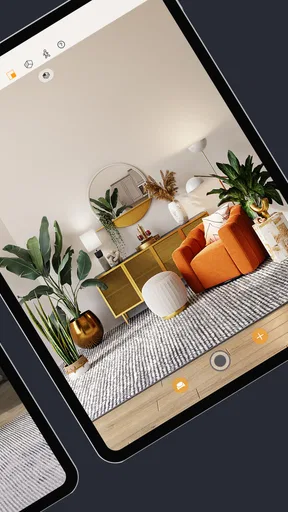
Our Review of JoyPlan-Quick House Design 3D
 Analysis by Appyee
I’d approach JoyPlan-Quick House Design 3D as a visual planning tool, not as a replacement for a professional floor plan or a contractor’s measurements. That distinction makes the first session much more useful: the goal is to test ideas, notice awkward furniture arrangements, and get a clearer sense of the room before spending money or moving heavy things.
What to expect from a first session
JoyPlan is a free home-design app from JOYPLAN PTE. LTD. Its focus is turning room ideas into a 3D view you can work with, rather than presenting itself as a general home-maintenance or shopping app. It has a 3.8 average from around 700 ratings and more than 500,000 installs, so it has found an audience, though that popularity alone does not tell me whether its design workflow will suit you.
The app is rated for Everyone, and its current version is 25.8.8. The core download is free, while in-app purchases range from around $1 to $300 per item. I’d begin by exploring the free experience and only consider a purchase if I could identify a specific tool or item I needed; there’s no reason to commit before you know whether the way it handles your room makes sense to you.
A calm route from install to a useful result
For a first project, choose one room with a clear purpose instead of trying to redesign the whole home. A bedroom, a small living area, or an empty room you’re about to furnish is easier to reason about than several connected spaces. Before opening the editor, jot down the room’s basic dimensions and the width of any large furniture you hope to keep. Having those figures nearby gives you a practical reference while you experiment.
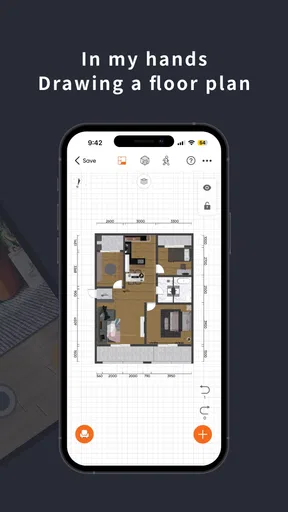
Then build a rough version of the room and add only the essentials: the main furniture, the largest openings or boundaries you can represent, and any pieces that determine how people move through the space. Don’t spend your first minutes choosing decorative details. A layout can look attractive in a 3D view and still fail in everyday use if a chair blocks a route or a door area feels crowded.
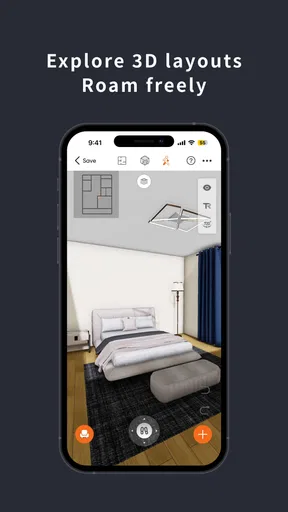
Your first meaningful success is not a perfect render. It’s finding one arrangement that looks plausible from more than one angle and leaves a comfortable path through the room. Save that version before trying a second layout. Keeping a simple baseline gives you something to compare against, and it is less frustrating than trying to remember which arrangement had the better sofa position.
Where the visual planning helps most
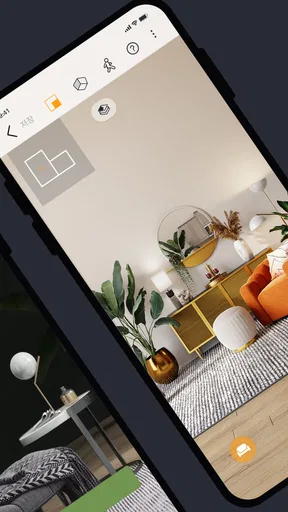
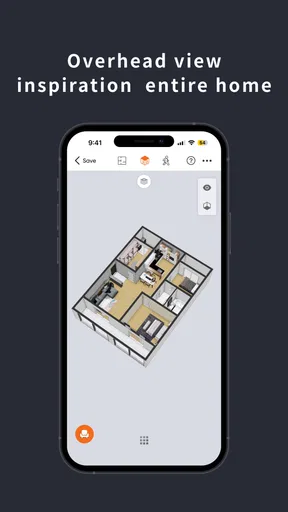
A useful everyday example is planning a living-room change before a weekend furniture rearrangement. I’d place the sofa and the largest storage piece first, then test whether the route from the doorway to the seating area stays clear. After that, I’d try a rug or lamp and check whether the overall balance still feels right. The 3D view is valuable here because it helps you inspect the room as a lived-in space, not just as a flat sketch.
JoyPlan can also help when you’re comparing two ideas with someone else. Instead of describing a layout and hoping the other person imagines the same thing, you can show a visual version and discuss specific choices. That makes it a handy conversation starter with a partner or family member, even if you still need a professional for technical decisions or exact renovation planning.
One trade-off worth keeping in mind is that a convincing visual arrangement depends on the quality of the information you put in. If your measurements are rough, treat the result as a concept rather than proof that a particular piece will fit. I’d measure again before buying furniture, especially where a narrow passage, an alcove, or a door swing could change the answer.
Who should try it—and who may prefer another route
I’d recommend JoyPlan to first-time decorators, renters testing furniture layouts, and homeowners who want to compare looks before committing to a change. It is particularly appealing if you think better in pictures than in written notes. A quick room mock-up can turn a vague idea—“the seating feels cramped”—into a more focused question about spacing and placement.
If you mainly need accurate construction drawings, detailed renovation specifications, or a dependable purchasing plan, a dedicated professional design or measurement workflow is a better fit. Likewise, if you already know exactly what you want and only need a short shopping list, a simple notes app and a tape measure may take less time. JoyPlan’s strength is visual exploration, so it earns its place when seeing alternatives is part of the decision.
Getting Started with JoyPlan
First things first, the app is available on both Android and iOS, which is a win for everyone. The download and installation process is smooth, and you’re greeted with a sleek, user-friendly interface upon opening it. The app doesn’t bombard you with tutorials, which I appreciate. Instead, it lets you dive straight into designing, which is perfect for those of us who are a bit impatient.
Features That Stand Out
One of the coolest things about JoyPlan-Quick House Design 3D is its extensive library of furniture and décor items. You can choose from a wide variety of styles, whether you’re into minimalist, boho, or something a bit more eclectic. The 3D rendering is impressive, allowing you to visualize your space in a way that feels almost real.
The app also lets you customize every little detail. Want to change the color of the walls? No problem. Thinking of adding a new rug or lamp? Easy peasy. The drag-and-drop functionality is intuitive, making it a breeze to swap out furniture and play around with different layouts.
Designing Your Dream Space
Once you start designing, it’s easy to lose track of time. The app allows you to create multiple rooms, so whether you’re redesigning your living room or planning a new kitchen, you’re covered. What I love is the ability to save your projects and revisit them later. It’s like having a little portfolio of all your design ideas.
Another nifty feature is the measurement tool. It ensures everything is to scale, preventing that dreaded moment when you realize your new couch won’t fit in the living room. Trust me, it’s a lifesaver.
Sharing and Collaborating
Once you’ve crafted your perfect space, sharing your design is a breeze. The app lets you export your designs and share them with friends or even your interior designer. Plus, it’s a fun way to show off your creativity on social media. You can also collaborate with others, which is great if you’re working on a project with a partner or family member.
Room for Improvement?
No app is perfect, and JoyPlan is no exception. While the app is generally stable, I did notice occasional lags when dealing with more complex designs. It’s not a deal-breaker, but something to keep in mind if you’re working on a large-scale project.
Additionally, while the item library is extensive, some users might find it lacking in certain niche styles. I’d love to see even more customization options in future updates, especially for those of us with unique tastes.
Making the most of a saved project
When I return to a design, I try to change one meaningful thing at a time. If I move the sofa, I leave the wall color and accessories alone for that pass; if I’m comparing colors, I keep the layout fixed. This simple approach makes the difference between versions easier to judge and stops a promising room from turning into a collection of unrelated experiments.
I’d also use the item library as a way to test proportion and mood, rather than assume every listed object is an exact match for something in a shop. Choose a piece that resembles the size and shape of what you own, then compare the overall composition. The important question is whether the room feels balanced and usable, not whether a decorative object reproduces every detail of a real product.
For a shared project, agree on the problem before discussing the design: more seating, a clearer walkway, or a better place for a desk. That gives feedback a practical focus. “This feels crowded near the entrance” is easier to act on than a broad disagreement about whether a room looks right, and it helps keep the app’s visual options from becoming a distraction.
Small trade-offs that affect the workflow
Although the drag-and-drop controls make experimentation approachable, a large or highly decorated plan can take more patience than a simple room. I’d work in passes: establish the layout, inspect the 3D view, and add smaller décor choices only after the major pieces make sense. That is a useful way to limit the impact of the occasional lag I encountered with more complex designs.
It is also worth separating inspiration from execution. A room mock-up can help you decide that a lighter wall color or a different furniture arrangement is worth trying, but it cannot account for every real-world constraint simply by looking convincing. Check measurements and practical requirements outside the visual plan before making purchases or starting a renovation. The app is most dependable as a thinking aid, not as the final authority on a costly decision.
Compared with sketching on paper, JoyPlan’s 3D presentation makes it easier to imagine how furniture and décor work together. Compared with a professional design service, it asks you to make more of the decisions yourself and is better suited to early exploration than technical documentation. That middle ground is its appeal: you can test a few plausible arrangements without turning a small decorating question into a full design engagement.
When I’d move on to another tool
If the main challenge is choosing between a few broad styles, JoyPlan’s furniture and décor options give you a visual starting point. If the challenge is whether a very specific item will fit between two fixed features, I’d prioritize direct measurements and the item’s real dimensions. And if a project involves structural changes or complex building work, I would take the app’s concept to a qualified professional rather than relying on a polished view to settle technical questions.
The same judgment applies to the paid options. Since the app is free to start and offers in-app purchases from around $1 to $300 per item, I’d avoid buying anything just because it appears during an exploratory session. First confirm that the free workflow helps you make a real decision; then judge any purchase by whether it solves a clear need in your own project.
The Final Verdict
All in all, JoyPlan is a fantastic tool for anyone looking to dip their toes into the world of interior design. It combines ease of use with powerful features, making it accessible for both beginners and seasoned designers. Whether you’re planning a major renovation or just looking to spice up your bedroom, this app has got you covered.
So, if you’re ready to unleash your inner designer, give this app a shot. Who knows, you might just discover a new passion or finally design that dream space you’ve always wanted. Happy designing!
My practical recommendation is to start small, save a baseline arrangement, and use the 3D view to answer one concrete question about your home. That gives a newcomer a reassuring first result without mistaking an attractive mock-up for a construction plan. If you enjoy comparing layouts and styles, JoyPlan is worth exploring; if precision drawings are the priority, choose a more specialized route and use this app only for visual inspiration.
Verdict
Strengths of JoyPlan-Quick House Design 3D
- Intuitive interface for quick design.
- Wide range of furniture options.
- Realistic 3D rendering.
- Easy export of design plans.
- Supports AR for real-world view.
Limitations of JoyPlan-Quick House Design 3D
- Limited free version features.
- Occasional lag on older devices.
- No offline mode available.
- High battery consumption.
- In-app purchases are pricey.
Similar Picks in This Category
View All
Universal TV Remote Control
CodeMatics Media Solutions3.9

AlfredCamera Home Security app
Alfred Systems Inc.4.7

Planner 5D: AI Home Design
Planner 5D4.5

Universal Tv Remote-Cast to TV
One Music Player4.1

Zillow: Homes for Sale & Rent
Zillow Group4.8

99acres Buy/Rent/Sell Property
infoedge.com4.3
Frequently Asked Questions
What is JoyPlan-Quick House Design 3D?
JoyPlan-Quick House Design 3D is a user-friendly application designed for both amateur and professional designers to create detailed house layouts in 3D. With intuitive controls and a range of customizable templates, users can visualize and modify their dream home designs on both Android and iOS devices.
Is JoyPlan-Quick House Design 3D suitable for beginners?
Yes, JoyPlan-Quick House Design 3D is perfect for beginners. The app includes a comprehensive tutorial mode that guides users through its features step-by-step. Additionally, its drag-and-drop functionality makes it easy to create and modify designs without needing prior design experience.
What features does JoyPlan-Quick House Design 3D offer?
JoyPlan-Quick House Design 3D offers a range of features including customizable room layouts, a library of furniture and décor items, realistic 3D rendering, and the ability to import floor plans. Users can also adjust lighting and textures to create a more lifelike representation of their designs.
Are there any in-app purchases within JoyPlan-Quick House Design 3D?
JoyPlan-Quick House Design 3D includes some in-app purchases. While the basic version is free, users can buy additional design elements and advanced features. These purchases enhance the app's functionality, providing more customization options and access to premium design tools.
Can I share my designs with others using JoyPlan-Quick House Design 3D?
Yes, JoyPlan-Quick House Design 3D allows users to easily share their designs. You can export your projects in various formats and share them via email or social media. This feature is particularly useful for collaborating with friends, family, or clients on design projects.
